There are common patterns to show how much of each kind of test is generally recommended. The most used are the Test Pyramid and the Test Trophy. Both are trying to communicate the same thing: design a test suite that is fast, gives you confidence, and is not more expensive to maintain than the value it brings.
Move failure detection as close to the developer as possible
Increase the speed of feedback
CI to take less than 10 minutes.
Recommended Test Pattern
Most of the tests are integration tests and emphasize maximizing deterministic test coverage in process with the development cycle, so developers can find errors sooner. E2E & functional tests should primarily focus on happy/critical path and tests that absolutely require a browser/app.
When executing continuous delivery, test code is a first class citizen that requires as much design and maintenance as production code. Flakey tests undermine confidence and should be terminated with extreme prejudice.
Testing Matrix
Feature
Static
Unit
Integration
Functional
Visual Regression
Contract
E2E
Deterministic
Yes
Yes
Yes
Yes
Yes
No
No
PR Verify, Trunk Verify
Yes
Yes
Yes
Yes
Yes
No
No
Break Build
Yes
Yes
Yes
Yes
Yes
No
No
Test Doubles
Yes
Yes
Yes
Yes
Yes
See Definition
No
Network Access
No
No
localhost only
localhost only
No
Yes
Yes
File System Access
No
No
No
No
No
No
Yes
Database
No
No
localhost only
localhost only
No
Yes
Yes
Testing Anti-patterns
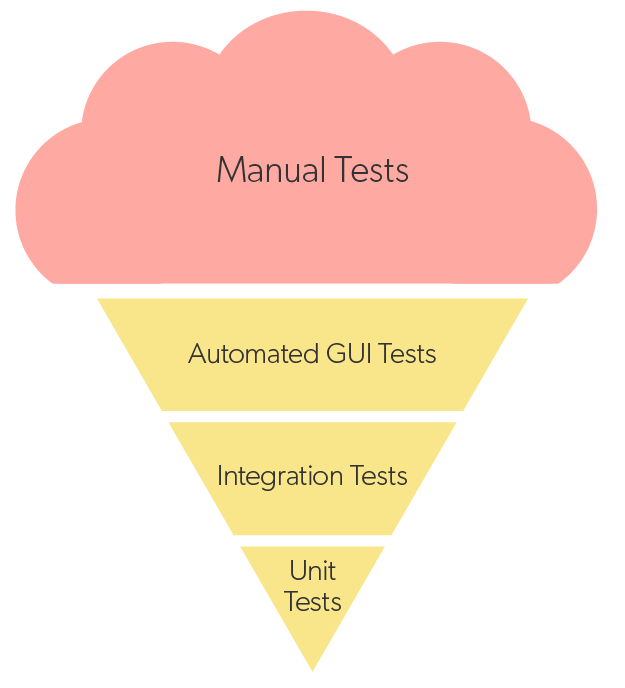
“Ice cream cone testing” is the anti-pattern where the most expensive, fragile, non-deterministic tests are prioritized over faster and less expensive deterministic tests because it “feels” right.
Standardized definitions for testing terms to establish ubiquitous language and reduce ambiguity in testing discussions
Testing terms and they are notoriously overloaded. If you ask 3 people what integration testing means you will get 4 different answers. This ambiguity within an organization slows down the engineering process as the lack of ubiquitous language causes communication errors. For us to help each other improve our quality processes, it is important that we align on a common language. In doing so, we understand that many may not agree 100% on the definitions we align to. That is ok. It is more important to be aligned to consensus than to be 100% in agreement. We’ll iterate and adjust as needed.
Note: Our definitions are based on the following sources:
A deterministic test is any test that always returns the same results for the same beginning state and action. Deterministic tests should always be able to run in any sequence or in parallel. Only deterministic tests should be executed in a CI build or automatically block delivery during CD.
Non-deterministic Test
A non-deterministic test is any test that may fail for reasons unrelated to adherence to specification. Reasons for this could include network instability, availability of external dependencies, state management issues, etc.
Static Test
A static test is a test that evaluates non-running code against rules for known good practices to check for security, structure, or practice issues.
Unit Test
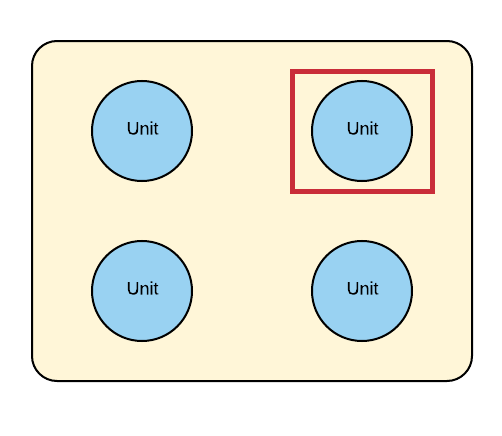
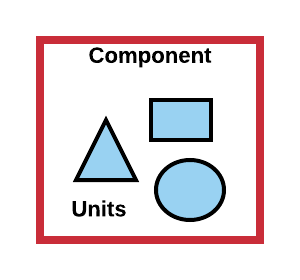
Unit tests are deterministic tests that exercise a discrete unit of the application, such as a function, method, or UI component, in isolation to determine whether it behaves as expected.
An integration test is a deterministic test to verify how the unit under test interacts with other units without directly accessing external sub-systems. For the purposes of clarity, “integration test” is not a test that broadly integrates multiple sub-systems. That is an E2E test.
A contract test is used to validate the test doubles used in a network integration test. Contract tests are run against the live external sub-system and exercises the portion of the code that interfaces to the sub-system. Because of this, they are non-deterministic tests and should not break the build, but should trigger work to review why they failed and potentially correct the contract.
A contact test validates contract format, not specific data.
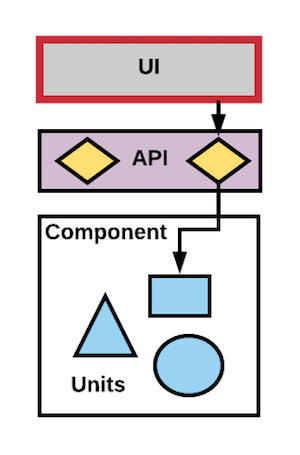
A functional test is a deterministic test that verifies that all modules of a sub-system are working together. They should avoid integrating with other sub-systems as this tends to reduce determinism. Instead, test doubles are preferred. Examples could include testing the behavior of a user interface through the UI or testing the business logic of individual services through the API.
End to end tests are typically non-deterministic tests that validate the software system along with its integration with external interfaces. The purpose of end-to-end Test is to exercise a complete production-like scenario. Along with the software system, it also validates batch/data processing from other upstream/downstream systems. Hence, the name “End-to-End”. End to End Testing is usually executed after functional testing. It uses actual production like data and test environment to simulate real-time settings.
Customer Experience Alarms are a type of active alarm. It is a piece of software that sends requests to your system much like a user would. We use it to test the happy-path of critical customer workflows. These requests happen every minute (ideally, but can be as long as every 5 minutes). If they fail to work, or fail to run, we emit metrics that cause alerts. We run these in all of our environments, not just production, to ensure that they work and we catch errors early.
Test doubles are one of the main concepts we use to create fast, independent, deterministic and reliable tests. Similar to the way Hollywood uses a _stunt double* to film dangerous scenes in a movie to avoid the costly risk a high paid actor gets hurt, we use a test double in early test stages to avoid the speed and dollar cost of using the piece of software the test double is standing in for. We also use test doubles to force certain conditions or states of the application we want to test. Test doubles can be used in any stage of testing but in general, they are heavily used during the initial testing stages in our CD pipeline and used much less in the later stages. There are many different kinds of test doubles such as stubs, mocks, spies, etc.
It warns of excessive complexity in the code that will degrade the ability to change it safely.
Identifies issues that could expose vulnerabilities
Shows anti-patterns that violate good practices
Alerts to issues with dependencies that may prevent delivery, create a vulnerability, or even expose the company to lawsuits.
It catches errors
Principles
When implementing any test, the test should be designed to provide alerts as close to the moment of creation as possible.
Static analysis, many scans can be run realtime in IDEs. Others during the build or as a pre-commit scan. Others require tooling that can only be used on the CI server. Whatever the test, drive it left.
Recheck everything on CI while verifying HEAD
Types of static tests
Linting: This automates catching of common errors in code and the enforcement of best practices
Formatting: Enforcement of code style rules. It removes subjectivity from code reviews
Complexity: Are code blocks too deep or too long? Complexity causes defects and simple code is better.
Type checking: Type checking can be a key validation to prevent hard to identify defects replacing certain classes of tests and logic otherwise required (e.g. unit tests validating internal APIs)
Security: Checking for known vulnerabilities and coding patterns that provide attack vectors are critical
Dependency scanning :
Are your dependencies up to date?
Has the dependency been hijacked?
Are there known security issues in this version that require immediate resolution?
Is it licensed appropriately?
Recommended Best Practices
IDE plugins to identify problems in realtime
Pre-commit hooks to prevent committing problems
Verification during PR and during the CI build on the HEAD to verify that earlier verification happened and was effective.
Discourage disabling of static tests (e.g. skipping tests, ignoring warnings, ignoring code on coverage evaluation, etc)
Write custom rules (lint, formatting, etc) for common code review feedback
Get your test suite to production-ready in one week
A practical guide to building a fast, reliable test suite that gives confidence without slowing down delivery. Focus on deterministic tests that run in CI and provide rapid feedback.
The Goal
Build a test suite that:
✅ Runs in under 10 minutes
✅ Is deterministic (same result every time)
✅ Catches real bugs before production
✅ Provides fast feedback to developers
✅ Doesn’t require heroic maintenance
Before You Begin
The Anti-Pattern to Avoid
Ice Cream Cone Anti-Pattern
Ice Cream Cone Testing = Lots of slow, fragile E2E tests, minimal fast unit/integration tests
Why this fails:
E2E tests are slow (minutes per test)
E2E tests are non-deterministic (flaky)
Debugging E2E failures is time-consuming
Developers stop trusting the tests
The Right Pattern
Most tests should be integration tests - fast, deterministic, testing real interactions without external dependencies.
# Run your test suite and capture metricsnpm test -- --verbose --timing
# ormvn test -DreportFormat=plain
Create a test inventory:
Test Inventory

Unit Tests:
  Count: _____
  Time: _____ seconds
  Failures (last week): _____

Integration Tests:
  Count: _____
  Time: _____ seconds
  Failures (last week): _____

E2E Tests:
  Count: _____
  Time: _____ minutes
  Failures (last week): _____

Total CI Time: _____ minutes
Flaky test rate: _____%
Red flags:
🚩 Total CI time > 10 minutes
🚩 Flaky test rate > 1%
🚩 More E2E tests than integration tests
🚩 Tests that require deployed environments
Day 2: Fix or Delete Flaky Tests
Action: Zero tolerance for non-deterministic tests
Flaky tests destroy confidence. They must be fixed immediately or deleted.
Identify flaky tests:
# Run tests 10 times, capture failuresfor i in {1..10};do npm test 2>&1| tee test-run-$i.log
done# Analyze failuresgrep "FAIL" test-run-*.log | sort | uniq -c
If a test can’t be made deterministic in 1 hour, delete it. It’s better to have no test than a test you can’t trust.
Day 3: Write Your First Integration Test
Integration tests are your highest-value tests. They test real component interactions without external dependencies.
Example: API Integration Test (Node.js)
// tests/integration/user-api.test.js
constrequest=require('supertest');constapp=require('../../src/app');const{setupTestDB,teardownTestDB}=require('../helpers/db');describe('User API',()=>{beforeAll(async()=>{awaitsetupTestDB();// In-memory or test DB
});afterAll(async()=>{awaitteardownTestDB();});describe('POST /api/users',()=>{it('creates a new user with valid data',async()=>{constresponse=awaitrequest(app).post('/api/users').send({username:'testuser',email:'test@example.com'}).expect(201);expect(response.body).toMatchObject({id:expect.any(Number),username:'testuser',email:'test@example.com'});// Verify in database
constuser=awaitUser.findById(response.body.id);expect(user.username).toBe('testuser');});it('rejects invalid email addresses',async()=>{awaitrequest(app).post('/api/users').send({username:'testuser',email:'not-an-email'}).expect(400);});it('prevents duplicate usernames',async()=>{// Create first user
awaitrequest(app).post('/api/users').send({username:'duplicate',email:'first@example.com'}).expect(201);// Attempt duplicate
awaitrequest(app).post('/api/users').send({username:'duplicate',email:'second@example.com'}).expect(409);// Conflict
});});});
// Takes 30 seconds, requires browser + full stack
test('user can update profile',async()=>{awaitpage.goto('http://localhost:3000/login');awaitpage.fill('[name=email]','user@example.com');awaitpage.fill('[name=password]','password123');awaitpage.click('button[type=submit]');awaitpage.waitForNavigation();awaitpage.goto('http://localhost:3000/profile');awaitpage.fill('[name=displayName]','New Name');awaitpage.click('button:has-text("Save")');awaitpage.waitForSelector('.success-message');expect(awaitpage.textContent('.display-name')).toBe('New Name');});
After: Integration Test (Fast, Reliable)
// Takes 50ms, no browser needed
test('user can update profile',async()=>{// Arrange: Create authenticated user
constuser=awaitcreateTestUser({email:'user@example.com'});consttoken=generateAuthToken(user.id);// Act: Update profile
constresponse=awaitrequest(app).put('/api/users/me').set('Authorization',`Bearer ${token}`).send({displayName:'New Name'}).expect(200);// Assert
expect(response.body.displayName).toBe('New Name');// Verify in database
constupdatedUser=awaitUser.findById(user.id);expect(updatedUser.displayName).toBe('New Name');});
Savings:
🚀 30 seconds → 50ms (600x faster)
✅ Deterministic (no browser timing issues)
🔧 Easier to debug (no UI layer)
Week 1 Results
After 5 days, you should have:
✅ Test inventory completed
✅ Zero flaky tests (fixed or deleted)
✅ 5-10 new integration tests covering critical paths
✅ External dependencies mocked using test doubles
✅ E2E tests reduced to < 5 critical scenarios
✅ CI time reduced (target: < 10 minutes)
Test-Driven Development (TDD)
Once you have a solid test foundation, consider TDD:
The Red-Green-Refactor Cycle:
1. 🔴 Red: Write a failing test
   - Write the test first
   - Run it, watch it fail
   - Confirm the failure message makes sense

2. 🟢 Green: Make it pass
   - Write the minimal code to pass
   - Don't worry about perfection
   - Get to green quickly

3. ♻️ Refactor: Improve the code
   - Tests passing? Now improve the design
   - Extract methods, rename variables
   - Tests should still pass
Example TDD Flow:
// 1. RED: Write failing test
test('calculates discount for VIP customers',()=>{constorder=newOrder({customerId:'vip-123',total:100});expect(order.finalPrice()).toBe(90);// 10% discount
});// FAILS - method doesn't exist
// 2. GREEN: Minimum code to pass
classOrder{finalPrice(){returnthis.total*0.9;// Hardcoded, but passes!
}}// 3. REFACTOR: Add more tests, improve design
test('no discount for regular customers',()=>{constorder=newOrder({customerId:'reg-456',total:100});expect(order.finalPrice()).toBe(100);});// FAILS
// Refactor to handle both cases
classOrder{finalPrice(){constcustomer=Customer.findById(this.customerId);constdiscount=customer.isVIP?0.1:0;returnthis.total*(1-discount);}}
Test order dependency (tests should be independent)
Race conditions (use proper async handling)
Fix:
// BAD: Timing-dependent
test('displays message after delay',async()=>{showMessage();awaitnewPromise(resolve=>setTimeout(resolve,1000));expect(getMessage()).toBe('Hello');});// GOOD: Wait for condition
test('displays message after delay',async()=>{showMessage();awaitwaitFor(()=>expect(getMessage()).toBe('Hello'));});
“Developers skip tests because they’re too slow”
Reality: If tests slow down development, they’ll be skipped or removed.
Solutions:
Speed up tests (see above)
Run subset locally (fast tests only)
Parallel execution
Watch mode (only run changed tests)
# Fast feedback loopnpm test -- --watch --changedSince=main
The goal of tests is confidence, not coverage. A small suite of fast, reliable tests that catch real bugs is infinitely better than a large suite of slow, flaky tests that everyone ignores.
4 - Unit Testing
Fast, deterministic tests that verify individual functions, methods, or components in isolation with test doubles for dependencies
Unit tests are deterministic tests that exercise a discrete unit of the application, such as a function, method, or UI component, in isolation to determine whether it behaves as expected.
When testing the specs of functions, prefer testing public API (methods, interfaces, functions) to private API: the spec of private functions and methods are meant to change easily in the future, and unit-testing them would amount to writing a Change Detector Test, which is an anti-pattern.
The purpose of unit tests are to:
Verify the functionality of a unit (method, class, function, etc.) in isolation
Good for testing hi-complexity logic where there may be many permutations (e.g. business logic)
Keep Cyclomatic Complexity low through good separations of concerns and architecture
Principles
Unit tests are low-level and focus on discrete units of the application
All dependencies are typically replaced with test-doubles to remove non-determinism
Unit tests are fast to execute
Test Suite is ran after every code change
Recommended Best Practices
Run a subset of your test suite based on the part of the code your are currently working on
Following TDD practices plus the watch functionality of certain testing frameworks is an easy way to achieve this
Pre-commit hooks to run the test suite before committing code to version control
Verification during PR and during the CI build on the HEAD to verify that earlier verification happened and was effective.
Discourage disabling of static tests (e.g. skipping tests, ignoring warnings, ignoring code on coverage evaluation, etc)
Write custom rules (lint, formatting, etc) for common code review feedback
// Example from lodash
describe('castArray',()=>{it('should wrap non-array items in an array',()=>{constvalues=falsey.concat(true,1,'a',{a:1});constexpected=lodashStable.map(values,(value)=>[value]);constactual=lodashStable.map(values,castArray);expect(actual).toEqual(expected);});it('should return array values by reference',()=>{constarray=[1];expect(castArray(array)).toBe(array);});it('should return an empty array when no arguments are given',()=>{expect(castArray()).toEqual([]);});});
@Test// Mock the userServicepublicvoidverifyMockedUserDetails()throwsException{// ===============Arrange===============ObjectMappermapper=newObjectMapper();UseruserMockData=mapper.readValue(newFile(TestConstants.DATA_FILE_ROOT+"user_mock.json"),User.class);// This code mocks the getUserInfo method for userService// Any call made to the getUserInfo will not make actual method call instead// returns the userMockDataMockito.when(userService.getUserInfo(TestConstants.userId)).thenReturn(userMockData);// ===============Act===============RequestBuilderrequestBuilder=MockMvcRequestBuilders.get("/user/"+TestConstants.userId).accept(MediaType.APPLICATION_JSON);MvcResultmvcResponse=mockMvc.perform(requestBuilder).andReturn();StringresponsePayload=mvcResponse.getResponse().getContentAsString();Stringstatus=JsonPath.parse(responsePayload).read("$.STATUS");Map<String,String>userMap=JsonPath.parse(responsePayload).read("$.payload");// ===============Assert===============JSONAssert.assertEquals(TestConstants.PARTIAL_MOCK_SUCCESS_PAYLOAD,responsePayload,false);// disable strict// validate the expected userMockData is matching with actual userMap DataAssert.assertEquals(TestConstants.SUCCESS,status);Assert.assertEquals(userMockData.getManager(),userMap.get("manager"));Assert.assertEquals(userMockData.getVp(),userMap.get("vp"));Assert.assertEquals(userMockData.getOrganization(),userMap.get("organization"));Assert.assertEquals(userMockData.getDirector(),userMap.get("director"));Assert.assertEquals(userMockData.getCostcenter(),userMap.get("costcenter"));}
Recommended Tooling
Platform
Tools
Android
Framework: JUnit5 Assertion: Google Truth
iOS
XCTest
Web
Framework: jest Assertion & Mocking: expect (jest), jest-dom, others as necessary Code Coverage: instanbul/nyc (jest)
Framework: jest Assertion & Mocking: expect (jest) - generic, supertest or nock - http server endpoint, apollo - graphql server testing Code Coverage: instanbul/nyc (jest)
5 - Integration Testing
Deterministic tests that verify how units interact together or with external systems using test doubles for non-deterministic dependencies
An integration test is a deterministic test to verify how the unit under test interacts with other units without directly accessing external sub-systems. For the purposes of clarity, “integration test” is not a test that broadly integrates multiple sub-systems. That is an E2E test.
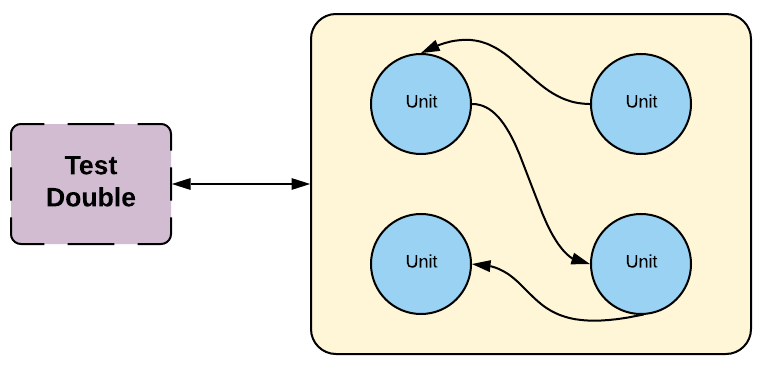
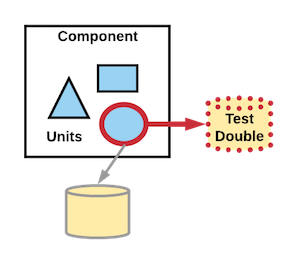
Some examples of an integration test are validating how multiple units work together (sometimes called a “sociable unit test”) or validating the portion of the code that interfaces to an external network sub-system while using a test double to represent that sub-system.
Validating the behavior of multiple units with no external sub-systems
Validating the portion of the code that interfaces to an external network
sub-system
When designing network integration tests, it’s recommended to also have contract tests running asynchronously to validate the service test doubles.
Recommended Best Practices
Integration tests provide the best balance of speed, confidence, and cost when building tests to ensure your system is properly functioning. The goal of testing is to give developers confidence when refactoring, adding features or fixing bugs. Integration tests that are decoupled from the implementation details will give you this confidence without giving you extra work when you refactor things. Too many unit tests, however, will lead to very brittle tests. If you refactor code (i.e. change the implementation w/out changing the functionality) the goal should be to NOT break any tests and ideally not even touch them at all. If lots of tests are breaking when you refactor, it’s probably a sign of too many unit tests and not enough integration tests.
Tests should be written from the perspective of how the actor experiences it.
Avoid hasty abstractions. Duplication in tests is not the enemy. In fact, it’s often better to have duplicated code in tests than it is to have complex abstractions. Tests should be damp, not DRY.
Design tests that alert to failure as close to defect creation as possible.
“Don’t poke too many holes in reality.” Only use mocks or test doubles when absolutely necessary to maintain determinism in your test. Justin Searls has a great talk about this.
Flakey tests need to be corrected to prevent false positives that degrade the ability of the tests to act as an effective code gate.
Write tests from the actor’s perspective and don’t introduce a test user. (e.g. When I give this input, I expect this outcome)
End-User - when building a UI, what response will each input provide to the user?
Consumer - when building a library or service, what output will be expected for a given input?
Don’t test implementation details. Tests should focus on what the outcomes are, not how the outcomes occurred.
Examples of testing implementation details include:
internal state
private methods/properties etc
things a user won’t see/know about.
Integration tests are normally run with unit tests.
Service Integration Tests
Service integration tests are focused on validating how the system under test responds to information from an external service and that service contracts can be consumed as expected. They should be deterministic and should not test the behavior of the external service. The integration can be from UI to service or service to service. A typical service integration test is a set of unit tests focused on interface schema and response codes for the expected interaction scenarios.
Use virtual services or static mocks instead of live services to ensure the test is repeatable and deterministic.
Implement contract tests to continuously validate the virtual service or mock is current.
Don’t over-test. When validating service interactions, testing that a dependency returns a specific value is testing the behavior of the dependency instead of the behavior of the SUT.
Database Integration Tests
Test data management is one of the more complex problems, so whenever possible using live data should be avoided.
Good practices include:
In-memory databases
Personalized datasets
Isolated DB instances
Mocked data transfer objects
Front End Driven Integration Tests
Don’t use tools like Enzyme that let you peek behind the curtain.
Follow the Accessibility order of operations to get a reference to elements (in prioritized order):
Things accessible to all users (Text, placeholder, label, etc)
Accessibility features (role, title, alt tag, etc)
Only after exhausting the first 2, then use test ID or CSS/XPath selectors as an escape hatch. But remember, the user doesn’t know about these so try to avoid them.
Alternate Terms
Sociable Unit Test
Alternate Definitions
When integrating multiple sub-systems into a larger system: this is an End to End Test.
When testing all modules within a sub-system through the API or user interface: this is a Functional Test.
describe("retrieving Hygieia data",()=>{it("should return counts of merged pull requests per day",async()=>{constsuccessStatus=200;constresult=awaithygieiaConnector.getResultsByDay(hygieiaConnector.hygieiaConfigs.integrationFrequencyRoute,testConfig.HYGIEIA_TEAMS[0],testConfig.getTestStartDate(),testConfig.getTestEndDate());expect(result.status).to.equal(successStatus);expect(result.data).to.be.an("array");expect(result.data[0]).to.haveOwnProperty("value");expect(result.data[0]).to.haveOwnProperty("dateStr");expect(result.data[0]).to.haveOwnProperty("dateTime");expect(result.team).to.be.an("object");expect(result.team).to.haveOwnProperty("totalAllocation");});it("should return an empty array if the team does not exist",async()=>{constresult=awaithygieiaConnector.getResultsByDay(hygieiaConnector.hygieiaConfigs.integrationFrequencyRoute,0,testConfig.getTestStartDate(),testConfig.getTestEndDate());expect(result.status).to.equal(successStatus);expect(result.data).to.be.an("array");expect(result.data.length).to.equal(0);});});
Recommended Tooling
Integration Tooling is the same as recommended for Unit Tests
6 - Contract Testing
Non-deterministic tests that validate test doubles by verifying contract format against live external systems
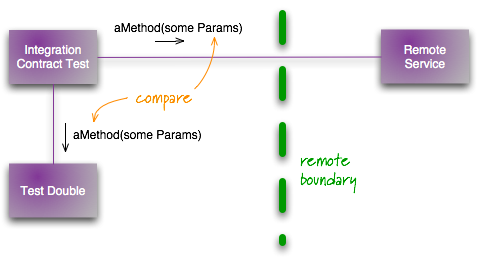
A contract test is used to validate the test doubles used in a network integration test. Contract tests are run against the live external sub-system and exercises the portion of the code that interfaces to the sub-system. Because of this, they are non-deterministic tests and should not break the build, but should trigger work to review why they failed and potentially correct the contract.
A contract test validates contract format, not specific data.
Contract tests have two points of view, Provider and Consumer.
Provider
Providers are responsible for validating that all API changes are backwards compatible unless otherwise indicated by changing API
versions. Every build should validate the API contract to ensure no unexpected changes occur.
Consumer
Consumers are responsible for validating that they can consume the properties they need (see Postel’s Law) and that no change
breaks their ability to consume the defined contract.
Recommended Best Practices
Provider contract tests are typically implemented as unit tests of the schema and response codes of an interface. As such they should be deterministic and should run on every commit, pull request, and verification of the trunk.
Consumer contract tests should avoid testing the behavior of a dependency, but should focus on comparing that the contract double still matches the responses from the dependency. This should be running on a schedule and any failures reviewed for cause. The frequency of the test run should be proportional to the volatility of the interface.
When dependencies are tightly aligned, consumer-driven contracts should be used
The consuming team writes automated tests with all consumer expectations
They publish the tests for the providing team
The providing team runs the CDC tests continuously and keeps them green
Both teams talk to each other once the CDC tests break
Provider Responsibilities:
Providers should publish machine-readable documentation of their interface to facilitate consumer testing and discoverability.
Even better, publish a dedicated technical compatibility kit that is tested on every build that provides a trusted virtual service to eliminate the need for consumer contract testing.
Understanding and implementing End-to-End (E2E) testing in software development
End-to-end tests validate the entire software system, including its integration with external interfaces. They exercise complete production-like scenarios, typically executed after functional testing.
E2E Test
Types of E2E Tests
Vertical E2E Tests
Target features under the control of a single team. Examples:
Favoriting an item and persisting across refresh
Creating a new saved list and adding items to it
Horizontal E2E Tests
Span multiple teams. Example:
Going from homepage through checkout (involves homepage, item page, cart, and checkout teams)
Note
Due to their complexity, horizontal tests are unsuitable for blocking release pipelines.
Recommended Best Practices
E2E tests should be the least used due to their cost in run time and in maintenance required.
Focus on happy-path validation of business flows
E2E tests can fail for reasons unrelated to the coding issues. Capture the frequency and cause of failures so that efforts can be made to make them more stable.
Vertical E2E tests should be maintained by the team at the start of the flow and versioned with the component (UI or service).
CD pipelines should be optimized for the rapid recovery of production issues. Therefore, horizontal E2E tests should not be used to block delivery due to their size and relative failure surface area.
A team may choose to run vertical E2E in their pipeline to block delivery, but efforts must be made to decrease false positives to make this valuable.
Alternate Terms
“Integration test” and “end-to-end test” are often used interchangeably.
Understanding and implementing Functional Testing in software development
Functional testing is a deterministic test that verifies all modules of a sub-system are working together. It avoids integrating with other sub-systems, preferring test doubles instead.
Functional Test
Overview
Functional testing verifies a system’s specification and fundamental requirements systematically and deterministically. It introduces an actor (typically a user or service consumer) and validates the ingress and egress of that actor within specific consumer environments.
Framework: jest Assertion & Mocking: expect (jest), supertest, nock, apollo Code Coverage: istanbul/nyc
9 - Test Doubles
Understanding and implementing Test Doubles in software testing
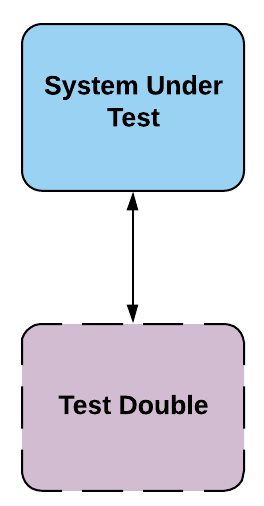
Test doubles are used to create fast, independent, deterministic, and reliable tests. They stand in for real components, similar to how stunt doubles are used in movies.
Test Double
Types of Test Doubles
Key Concepts
Test Double: Generic term for any production object replacement in testing
Dummy: Passed around but never used; fills parameter lists
Fake: Has a working implementation, but not suitable for production
Stub: Provides canned answers to calls made during the test
Spy: A stub that records information about how it was called
Mock: Pre-programmed with expectations, forming a specification of expected calls
Provides a common when this →then that mocking API in an Idiomatic Kotlin DSL; Built-in support for mocking top-level functions, extensions, static objects; Detailed documentation with examples
Process local mock server; Embedded in tests, no separate mock execution; Simplistic but powerful API that can support state
iOS
iOS Approach
For iOS, we prefer using Apple test frameworks with homegrown solutions on top. This approach helps manage rapid API changes and reduces dependency on potentially discontinued third-party solutions.
Standard mocking tool; Has annotations for easy creation of many mocks at test construction
10 - Customer Experience Alarms
Active monitoring that sends requests to test critical customer workflows every minute to ensure system health and catch errors early
Customer Experience Alarms are a type of active alarm. It is a piece of software that sends requests to your system much like a user would. We use it to test the happy-path of critical customer workflows. These requests happen every minute (ideally, but can be as long as every 5 minutes). If they fail to work, or fail to run, we emit metrics that cause alerts. We run these in all of our environments, not just production, to ensure that they work and we catch errors early.
These are different than having log-based alarms because we can’t guarantee that someone is working through all of the golden-path workflows for our system at all times. If we rely entirely on logs, we wouldn’t know if the golden workflows are accurate when we deploy at 3am on a Saturday due to an automated process.
These tests have a few important characteristics:
They are run in all environments, including production.
They aren’t generated from UI workflows, but rather from direct API access
They ideally run every minute.
If they don’t work (in production) they page someone. Even at 3am.
Alternate Terms
Synthetic Probes (Google)
Canary (Amazon, although it doesn’t mean what Canary means here)
11 - Testing Best Practices
Comprehensive guide to test-first approaches, naming conventions, test effectiveness, and practices for building maintainable test suites
Lower cost to maintain, faster speed to execute, less time to develop, confidence, stability
Use Case Coverage
One of the main points behind testing is to be able to code with confidence. Code coverage is one way developers have traditionally used to represent how confident they feel about working on a given code base. That said, how much confidence is needed will likely vary by team and the type of application being tested. E.g. if working on a life saving med tech piece of software, you probably want all of the confidence in the world. The following discusses how code coverage, if misused, can be misleading and create a false sense of confidence in the code being worked on and as a result, hurt quality. Recommendations on how to manage code coverage in a constructive way will be presented, along with concrete approaches on how to implement them.
In simple terms, coverage refers to a measurement of how much of your code is executed while tests are running. As such, it’s entirely possible achieve 100% coverage by running through your code without really testing for anything, which is what opens the door for coverage having the potential of hurting quality if you don’t follow best practices around it. A recommended practice is to look at coverage from the perspective of the set of valid use cases supported by your code. For this, you would follow an approach similar to what follows:
Start writing code and writing tests to cover for the use cases you’re supporting with your code.
Refine this by going over the tests and making sure valid edge cases and alternative scenarios are covered as well.
When done, look at your code’s coverage report and identify gaps in your testing
For each gap, decide if the benefit of covering it (odds of it failing and impact if it does) outweighs the cost (how complicated / time consuming would it be to cover it)
Write more tests where appropriate
This practices shifts the value of coverage from being a representation of your code’s quality to it being a tool for finding untested parts of your code. When looking at coverage through this lens, you might also uncover parts of the code with low coverage because it’s not supporting a valid use case. We recommend tests are not written for this, instead this code should be removed from the code base if at all possible.
You might ask yourself “How do I know I have good coverage? What’s the magic number?”. We believe there’s no magic number, as it’ll all depend on your teams’ needs. If you are writing tests for the use cases you build into your application, your team feels very confident when modifying the code base, and you’re post-production error rate is very low, your coverage is probably fine, whatever the numbers say. In the end, forcing a coverage percentage is known to have the potential of hurting your quality. By chasing after every single code path, you can very well end up missing the use cases that if gone wrong, will hurt the most. Another consideration is the false sense of confidence you can get by high coverage numbers obtained by “gaming the system”, or as Martin Fowler said, “The trouble is that high coverage numbers are too easy to reach with low quality testing” (Fowler, 2012). We do recognize there is such a thing as too little coverage. If your coverage is very low (e.g. < 50%) there might be something off, like having a ton of unnecessary code you might want to get rid of, or your tests just not hitting all the critical use cases in your application. There are methods you can employ to make sure there are no instances of “gaming the system” in your test code. One of these is to create linting rules that look for these practices and fail the build when it finds them. We recommend using plugins like eslint-plugin-jest to make sure things like not expecting (asserting) or disabling of tests cause the build to break.
Another recommendation when managing your code coverage is to track when it goes down. Generally it shouldn’t and if / when it does, it should be explainable and trigger a build failure. Along this same line, raising the bar whenever coverage is increased is a good practice as it ensures the level of coverage in other areas is maintained as they were. We recommend automating this so that whenever your coverage percentage increases, so do your minimum thresholds. Once you have reached a certain level of coverage through the methods discussed above (e.g. covering for use cases, taking care of valid edge cases when appropriate, etc) we don’t recommend you actively work on increasing your code coverage percentages. Instead, the way we recommend coverage to go up is as a side effect of building good software. This means that, as you increase your delivery frequency while monitoring your key stability metrics (e.g post-production defects, performance or service degradations, etc) you should see your code coverage increase.
Test-First Approach: BDD and TDD
Defining tests prior to writing code is the best way to lock in behavior and produce clean code. BDD and TDD are complementary processes to accomplish this goal and we recommend teams use both to first uncover requirements (BDD) and then do development against these requirements (TDD).
BDD
Behavior Driven Development is the process of defining business requirements as testable acceptance criteria and then implementing them using a test-first development approach. Examples and references for BDD can be found in the playbook on BDD.
When coding tests, the test statements should clearly describe what is being executed so that we can create a shared understanding of what’s getting build by all stakeholders. Tests are the living documentation for what the application is doing and test results should be effective on-boarding documentation.
TDD
Test-driven development is the practice of writing a failing test before the implementation of a feature or bug fix. Red -> Green -> Refactor refers to the TDD process of adding a failing (red) test, implementing that failing test to make it pass (green) and then cleaning up the code after that (refactor). This approach to testing gives you confidence as it avoids any false positives and also serves as a design mechanism to help you write code that is decoupled and free of unnecessary extra code. TDD also drives up code coverage organically due to the fact that each use case gets a new test added.
People often confuse writing tests in general with TDD. Writing tests after implementing a use case is not the same as TDD, that would be test oriented application development (TOAD) and like a toad, it has many warts. The process for toad would be green, green then refactor at a later date, maybe. The lack of a failing test in that process opens the door for false positive tests and often ends up taking more time as the code and tests end up needing to both be refactored. In addition, the design of an api is not considered as things are developed from the bottom up, not from the top down. This can lead to tight coupling, unnecessary logic and other forms of tech debt in the codebase.
Naming Conventions
Test names should generally be descriptive and inclusive of what is being tested. A good rule of thumb when deciding a test name is to follow the “given-when-then” or “arrange-act-assert” conventions focusing on the “when” and “act” terms respectively. In both of these cases there is an implied action or generalized assertion that is expected, a test name should include this implication explicitly with an appropriate result effect description. For example:
// Jest Example
// "input validator with valid inputs should contain a single valid field caller receives success state"
describe("input validator",()=>{describe("with valid inputs",()=>{it("should contain a single valid field caller receives success state",()=>{});});});
// JUnit Example// "input validator with valid inputs should contain a single valid field caller receives success state"@DisplayName("input validator")publicclassInputValidationTest{@Nested@DisplayName("with valid inputs")classValidScenarios{@Test@DisplayName("should contain a single valid field caller receives success state")publicvoidcontainsSingleValidField(){// }}}
Casing
For test environments that require method names to describe its tests and suites it is recommended that they follow their language and environment conventions. See formatting under static testing for further best practices.
Grouping
Where possible suites and their respective tests should be grouped to allow for higher readability and identification; If the environment supports it nested groups is also a useful and good practice to employ. For example a logical nesting of “unit-scenario-expectation” allows for encapsulating multiple scenarios that could potentially apply to a unit under test. For example:
Prevent common anti-patterns like disabling, skipping, or commenting test cases or coverage gathering
Make sure it’s still covering for valid use cases