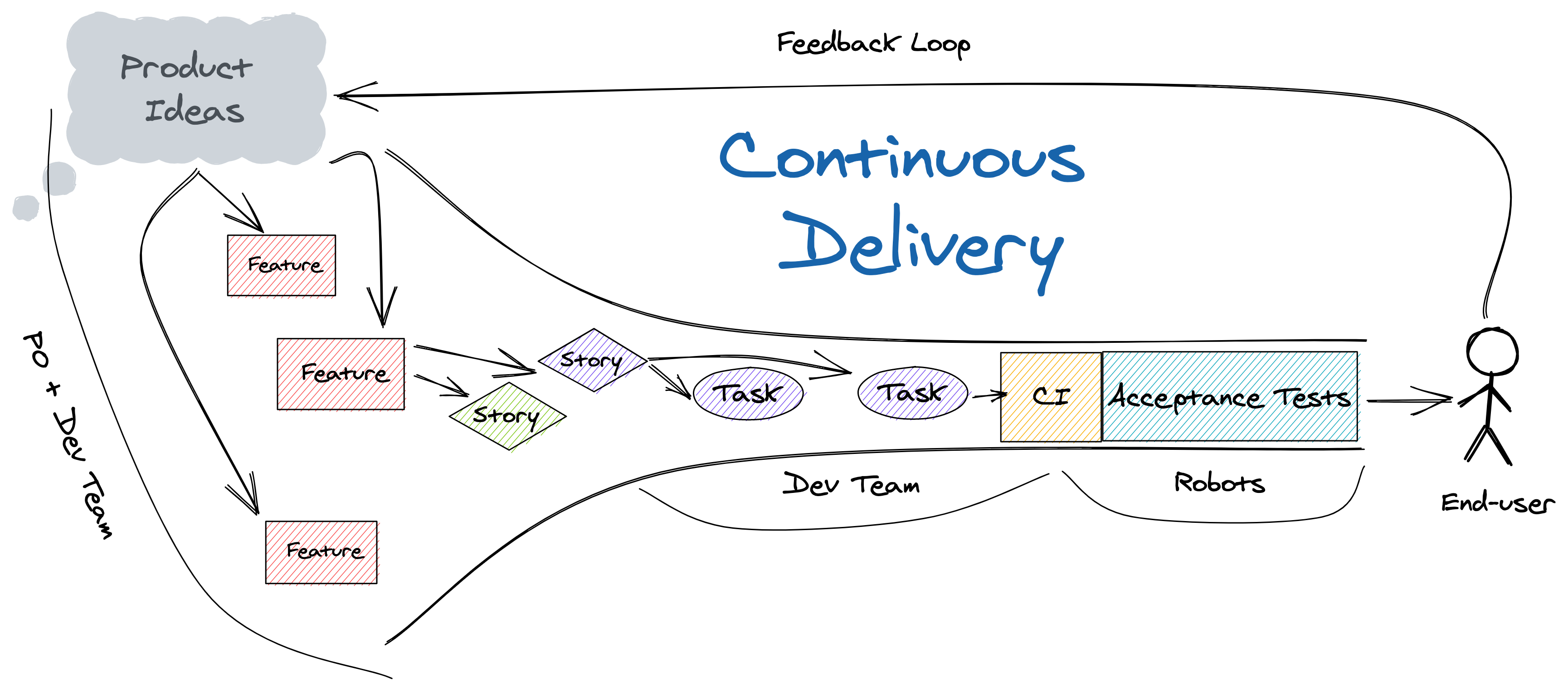
Continuous Delivery (CD) is the ability to deliver the latest changes on-demand, with no human touchpoints between code integration and production delivery.
Overview
CD Pipeline
Continuous Delivery extends beyond automation. It encompasses the entire cycle of identifying value, delivering it, and verifying with the end-user that the expected value was delivered.
Goals
CD aims to:
Uncover external dependencies and organizational process issues
Reduce overhead
Improve quality feedback
Enhance end-user outcomes and team work/life balance
CD Maturity
While avoiding rigid “maturity models,” we can outline competency levels:
Minimums
Daily integration of tested changes to the trunk
Consistent delivery process for all changes
No manual quality gates
Same artifact used in all environments
Good
New work delivered in less than 2 days
All changes delivered from the trunk
Commit-to-production time under 60 minutes
Less than 5% of changes require remediation
Service restoration time under 60 minutes
Continuous Integration (CI)
CI Working Agreement
Branches originate from trunk and are deleted within 24 hours
Changes must pass existing tests before merging
Team prioritizes completing work in progress over starting new work
Fixing a broken build is the highest priority
Desired Outcomes
More frequent integration of smaller, higher quality changes
Efficient test architecture
Lean code review process
Reduced Work In Progress (WIP)
Continuous Delivery/Deploy
Aims to achieve:
Increased delivery frequency and stability
Improved deploy success and time to restore service
Reduced development cycle time and process waste
Smaller, less risky production releases
High-performing product teams with domain expertise
CD Dependencies - Visual guide showing how practices like TDD, BDD, and Trunk-Based Development build upon each other to enable CD. See practices.minimumcd.org for detailed implementation guides.
Implement a single CD automated pipeline per repository
Note
A valid CD process has only one method to build and deploy any change. Deviations indicate an incomplete process that puts the team and business at risk.
Pipeline Best Practices
Focus on hardening the pipeline to block bad changes
Integrate outside the pipeline, virtualize inside
Limit stage gates (ideally one or fewer)
Developers own the full pipeline
Key Metrics
CI cycle time: < 10 minutes from commit to artifact creation
CD cycle time: < 60 minutes from commit to Production
Tips
Use trunk merge frequency, development cycle time, and delivery frequency to uncover pain points
Practical first steps to begin your Continuous Delivery journey
This guide provides actionable steps teams can take in their first week to begin implementing Continuous Delivery practices. Start small, measure progress, and build momentum.
Before You Begin
Continuous Delivery is a journey, not a destination. You don’t need to have everything perfect before you start. Focus on making incremental improvements and learning from each change.
Prerequisites
A source code repository with your application
A basic build process (even if manual)
At least one deployed environment
Team buy-in to try new practices
Week 1: Foundation
Day 1: Establish Your Baseline
Action: Measure your current state
Before improving, understand where you are. Capture these baseline metrics:
Current State Assessment

Development:
- How long from starting work to merging code? _____ days
- How many branches exist right now? _____
- How long do branches live before merging? _____ days
- How often does the trunk break? _____ times/week

Delivery:
- How long from code merge to production? _____ days/weeks
- How many manual steps in deployment? _____
- What % of deployments require hotfixes? _____%
- How long to restore service after failure? _____ hours
Why this matters: You can’t improve what you don’t measure. These numbers will guide your improvement efforts and prove progress.
Day 2: Define Your Working Agreement
Action: Create a CI Working Agreement
Have a team discussion and agree to start with these practices:
CI Working Agreement (v1)We agree to:
✓ Merge code to trunk at least once per day
✓ Keep branches alive less than 24 hours
✓ Fix broken builds before starting new work
✓ Include automated tests with every change
✓ Review pull requests within 2 hours
✓ Prioritize completing in-progress work over starting new work
Starting: [DATE]Review: [DATE + 2 weeks]
Tip
Start with what feels achievable, then tighten the agreement as you improve. It’s better to keep a loose agreement than break a strict one.
Day 3: Automate Your Build
Action: Create a scripted build process
If your build has any manual steps, automate them first.
Example build script:
#!/bin/bash
# build.sh - Single command to build from clean checkoutset -e # Exit on any errorecho"🔨 Building application..."# Install dependenciesnpm ci # or: mvn dependency:resolve, pip install -r requirements.txt# Run lintersnpm run lint
# Run testsnpm test# Build artifactsnpm run build
echo"✅ Build complete! Artifact: dist/app-${VERSION}.tar.gz"
Success criteria:
Anyone can build from a clean checkout with one command
Build includes automated tests
Build produces the same artifact every time
Day 4: Set Up Continuous Integration
Action: Configure automated builds on every commit
Choose a CI server (GitHub Actions, GitLab CI, Jenkins, etc.) and configure it to:
When the build breaks, stop everything and fix it. A broken trunk means no one can integrate safely. This is your new highest priority.
Day 5: Implement Trunk-Based Development
Action: Move to short-lived branches
Today’s changes:
Delete all long-lived feature branches (merge or abandon)
Set branch protection rules:
- Require PR reviews (1 reviewer minimum)
- Require CI to pass
- Delete branch after merge
Create a branching guide:
Branching Guide
Creating a branch:
git checkout main
git pull
git checkout -b [initials]/[story-id]-[short-description]Example: git checkout -b brf/JIRA-123-add-login-validation
Working on a branch:
- Keep changes small (< 400 lines changed) - Commit frequently
- Push at least daily
- Open PR early (use "Draft"if not ready)Merging:
- Merge within 24 hours of creation
- Delete branch immediately after merge
Pipeline Stages (Minimal)1. Build & Test (automated) ↓
2. Deploy to Dev (automated) ↓
3. Smoke Test (automated) ↓
4. Deploy to Production (manual trigger, automated execution)
Key principles:
Same artifact flows through all environments
Configuration is external to the artifact
Deployment is scripted (no manual steps)
Failed deployments stop the pipeline
Implement Automated Rollback
Action: Ensure you can roll back automatically
#!/bin/bash
# rollback.shPREVIOUS_VERSION=$(get_previous_version)echo"Rolling back to version: $PREVIOUS_VERSION"./deploy.sh $PREVIOUS_VERSION# Verify rollback./smoke-test.sh ||echo"⚠️ Rollback verification failed!"
Week 3: Improve Quality Feedback
Expand Test Coverage
Action: Add tests for your critical paths
Priority order:
Integration tests for API contracts (fastest value)
Unit tests for business logic
End-to-end tests for critical user journeys (max 3-5)
Duration: 1 hour

1. Review metrics (10 min)
   - What improved?
   - What got worse?

2. Three questions (30 min)
   - What's slowing us down?
   - What's one thing we could improve?
   - What do we want to try next?

3. Action items (20 min)
   - Pick ONE thing to improve
   - Define success criteria
   - Assign owner
   - Set review date
✅ Baseline metrics captured and visible to the team
✅ CI working agreement established and followed
✅ Automated build that runs on every commit
✅ Short-lived branches (< 24 hours)
✅ Basic deployment pipeline to at least one environment
✅ Team retrospective scheduled and completed
Q: Can we skip steps?
A: You need the foundation (Days 1-4) before the delivery pipeline will work. After that, adapt to your context.
Q: What if management won’t let us merge daily?
A: Start by demonstrating value. Show reduced bugs, faster delivery, and improved predictability. Data wins arguments.
Q: Do we need to do all this before starting CD?
A: No! This guide IS starting CD. You’ll refine practices as you go.
Q: How do we handle database changes?
A: Database changes must be backward compatible. Deploy schema changes separately from code changes. More at CD Problems.
Remember
Continuous Delivery is about building a culture of continuous improvement. Start where you are, measure everything, and make small, frequent improvements.
2 - Common Blockers
Common issues teams encounter when implementing Continuous Delivery and how to resolve them
The following are very frequent issues that teams encounter when working to improve the flow of delivery.
Work Breakdown
Stories without testable acceptance criteria
All stories should be defined with declarative and testable acceptance criteria. This reduces the amount
of waiting and rework once coding begins and enables a much smoother testing workflow.
Acceptance criteria should define “done” for the story. No behavior other than that specified by the acceptance
criteria should be implemented. This ensures we are consistently delivering what was agreed to.
Stories too large
It’s common for teams using two week sprints to have stories that require five to ten days to complete. Large stories hide complexity, uncertainty, and dependencies.
Stories represent the smallest user observable behavior change.
To enable rapid feedback, higher quality acceptance
criteria, and more predictable delivery, Stories should require no more than two days for a team to deliver.
No definition of “ready”
Teams should have a working agreement about the definition of “ready” for a story or task. Until the team agrees it has
the information it needs, no commitments should be made and the story should not be added to the “ready” backlog.
Definition of Ready

- Story
  - Acceptance criteria aligned with the value statement agreed to and understood.
  - Dependencies noted and resolution process for each in place
  - Spikes resolved.

- Sub-task
  - Contract changes documented
  - Component acceptance tests defined
No definition of “Done”
Having an explicit definition of done is important to keeping WIP low and finishing work.
Definition of Done

- Sub-task
  - Acceptance criteria met
  - Automated tests verified
  - Code reviewed
  - Merged to Trunk
  - Demoed to team
  - Deployed to production

- Story
  - PO Demo completed
  - Acceptance criteria met
  - All tasks "Done"
  - Deployed to production
Team Workflow
Assigning tasks for the sprint
Work should always be pulled by the next available team member. Assigning tasks results in each team member working in isolation on a task list instead of the team
focusing on delivering the next high value item. It also means that people are less invested in the work other people
are doing. New work should be started only after helping others
complete work in progress.
Co-dependant releases
Multi-component release trains increase batch size and reduce delivered quality. Teams cannot improve efficiency if they
are constantly waiting. Handle dependencies with code, do not manage them with process. If you need a person to
coordinate releases, things are seriously broken.
Handoffs to other teams
If the normal flow of work requires waiting on another team then batch sizes increase and quality is reduced. Teams
should be organized so they can deliver their work without coordinating outside the team.
Early story refining
As soon as we decide a story has been refined to where we can begin developing it, the information begins to age because
we will never fully capture everything we decided on. The longer a story is “ready” before we being working, the less
context we retain from the conversation. Warehoused stories age like milk. Limit the inventory and spend more time on
delivering current work.
Manual test as a stage gate
In this context, a test is a repeatable, deterministic activity to verify the releasability of the system. There are
manual activities related to exploration of edge cases and how usable the application is for the intended consumer, but these
are not tests.
There should be no manual validation as a step before we deploy a change. This includes, but is not limited to manual
acceptance testing, change advisory boards (CAB), and manual security testing.
Meaningless retrospectives
Retrospectives should be metrics driven. Improvement items should be treated as business features.
Hardening / Testing / Tech Debt Sprints
Just no. These are not real things. Sprints represent work that can be
delivered to production.
Moving “resources” on and off teams to meet “demand”
Teams take time to grow, they cannot be “constructed”. Adding or removing anyone
from a team lowers the team’s maturity and average problem space expertise. Changing too many people on a team
reboots the team.
One delivery per sprint
Sprints are planning increments, not delivery increments. Plan what will be delivered daily during the sprint.
Skipping demo
If the team has nothing to demo, demo that. Never skip demo.
Committing to distant dates
Uncertainty increases with time. Distant deliverables need detailed analysis.
Not committing to dates
Commitments drive delivery. Commit to the next Minimum Viable Feature.
Velocity as a measure of productivity
Velocity is planning metric. “We can typically get this much done in this much time.” It’s an estimate of relative
capacity for new work that tends to change over time and these changes don’t necessarily indicate a shift in productivity. It’s
also an arbitrary measure that varies wildly between organizations, teams and products. There’s no credible means of
translating it into a normalized figure that can be used for meaningful comparison.
By equating velocity with productivity there is created an incentive to optimize velocity at the expense of developing quality software.
CD Anti-Patterns
Work Breakdown
Issue
Description
Good Practice
Unclear requirements
Stories without testable acceptance criteria
Work should be defined with acceptance tests to improve clarity and enable developer driven testing.
Long development Time
Stories take too long to deliver to the end user
Use BDD to decompose work to testable acceptance criteria to find smaller deliverables that can be completed in less than 2 days.
Workflow Management
Issue
Description
Good Practice
Rubber band scope
Scope that keeps expanding over time
Use BDD to clearly define the scope of a story and never expand it after it begins.
Focusing on individual productivity
Attempting to manage a team by reporting the “productivity” of individual team members. This is the fastest way to destroy teamwork.
Measure team efficiency, effectiveness, and morale
Estimation based on resource assignment
Pre-allocating backlog items to the people based on skill and hoping that those people do not have life events.
The whole team should own the team’s work. Work should be pulled in priority sequence and the team should work daily to remove knowledge silos.
Meaningless retrospectives
Having a retrospective where the outcome does not results in team improvement items.
Focus the retrospective on the main constraints to daily delivery of value.
Skipping demo
No work that can be demoed was completed.
Demo the fact that no work is ready to demo
No definition of “Done” or “Ready”
Obvious
Make sure there are clear entry gates for “ready” and “done” and that the gates are applied without exception
One or fewer deliveries per sprint
The sprint results in one or fewer changes that are production ready
Sprints are planning increments, not delivery increments. Plan what will be delivered daily during the sprint. Uncertainty increases with time. Distant deliverables need detailed analysis.
Pre-assigned work
Assigning the list of tasks each person will do as part of sprint planning. This results in each team member working in isolation on a task list instead of the team focusing on delivering the next high value item.
The whole team should own the team’s work. Work should be pulled in priority sequence and the team should work daily to remove knowledge silos.
Teams
Issue
Description
Good Practice
Unstable Team Tenure
People are frequently moved between teams
Teams take time to grow. Adding or removing anyone from a team lowers the team’s maturity and average expertise in the solution. Be mindful of change management
Poor teamwork
Poor communication between team members due to time delays or “expert knowledge” silos
Make sure there is sufficient time overlap and that specific portions of the system are not assigned to individuals
Multi-team deploys
Requiring more than one team to deliver synchronously reduces the ability to respond to production issues in a timely manner and delays delivery of any feature to the speed of he slowest teams.
Make sure all dependencies between teams are handled in ways that allow teams to deploy independently in any sequence.
Testing Process
Issue
Description
Good Practice
Outsourced testing
Some or all of acceptance testing performed by a different team or an assigned subset of the product team.
Building in the quality feedback and continuously improving the same is the responsibility of the development team.
Manual testing
Using manual testing for functional acceptance testing.
Manual tests should only be used for things that cannot be automated. In addition, manual tests should not be blockers to delivery but should be asynchronous validations.
3 - Pipeline & Application Architecture
A guide to improving your delivery pipeline and application architecture for Continuous Delivery
This guide provides steps and best practices for improving your delivery pipeline and application architecture. Please review the CD Getting Started guide for context.
1. Build a Deployment Pipeline
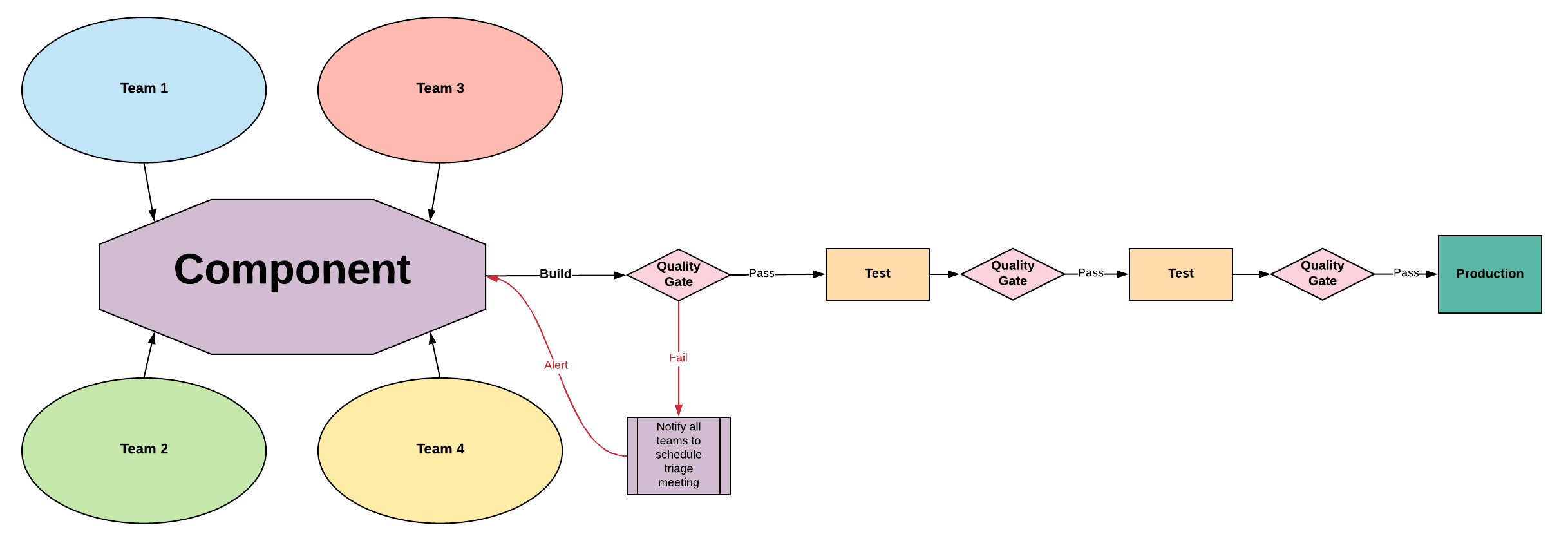
The first step is to create a single, automated deployment pipeline to production. Human intervention should be limited to approving stage gates where necessary.
Entangled Architecture - Requires Remediation
Entangled Architecture
Characteristics
No clear ownership of components or quality
Delayed quality signal
Difficult to implement Continuous Delivery
Common Entangled Practices
Team Structure: Feature teams focused on cross-cutting deliverables
Development Process: Long-lived feature branches
Branching: Team branches with daily integration to trunk
Testing: Inverted test pyramid common
Pipeline: Focus on establishing reliable build/deploy automation
Deploy Cadence / Risk: Extended delivery cadence, high risk
Entangled Improvement Plan
Find architectural boundaries to divide sub-systems between teams, creating product teams. This will realign to a tightly coupled architecture.
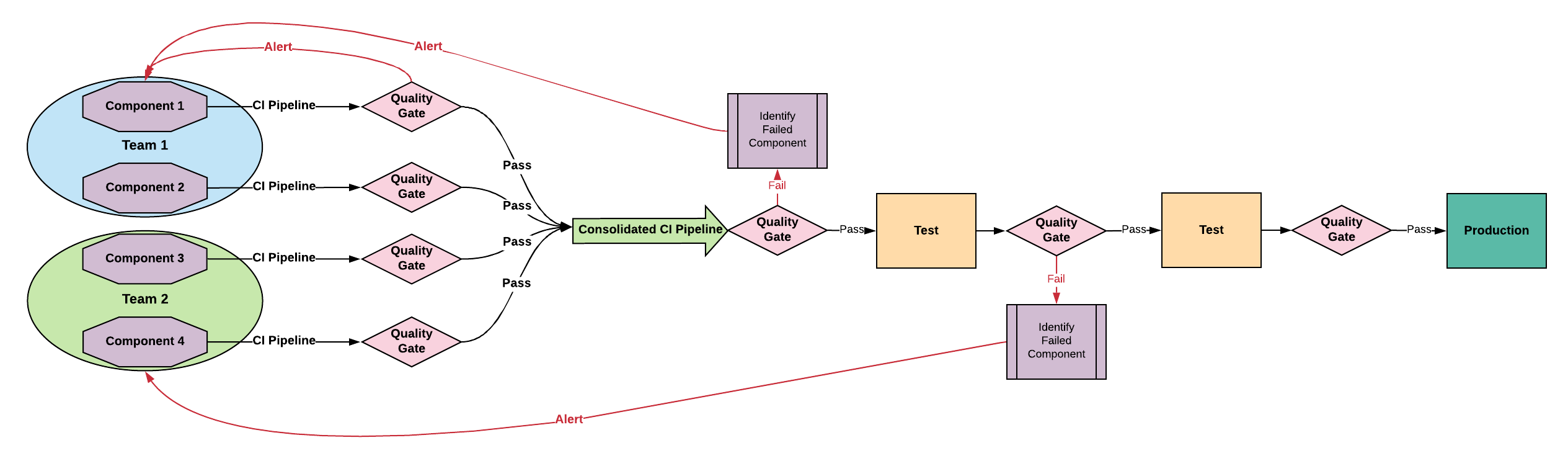
Tightly Coupled Architecture - Transitional
Tightly Coupled Architecture
Characteristics
Changes in one part can affect other parts unexpectedly
Sub-assemblies assigned to product teams
Requires a more complex integration pipeline
Common Tightly Coupled Practices
Team Structure: Product teams focused on decoupling sub-systems
Development Process: Continuous integration
Branching: Trunk-Based Development
Testing: Developer Driven Testing
Pipeline: Working towards continuous delivery
Deploy Cadence / Risk: More frequent deliveries, lower risk
Tightly Coupled Improvement Plan
Extract independent domain services with well-defined APIs
Consider wrapping infrequently changed, poorly tested components in APIs
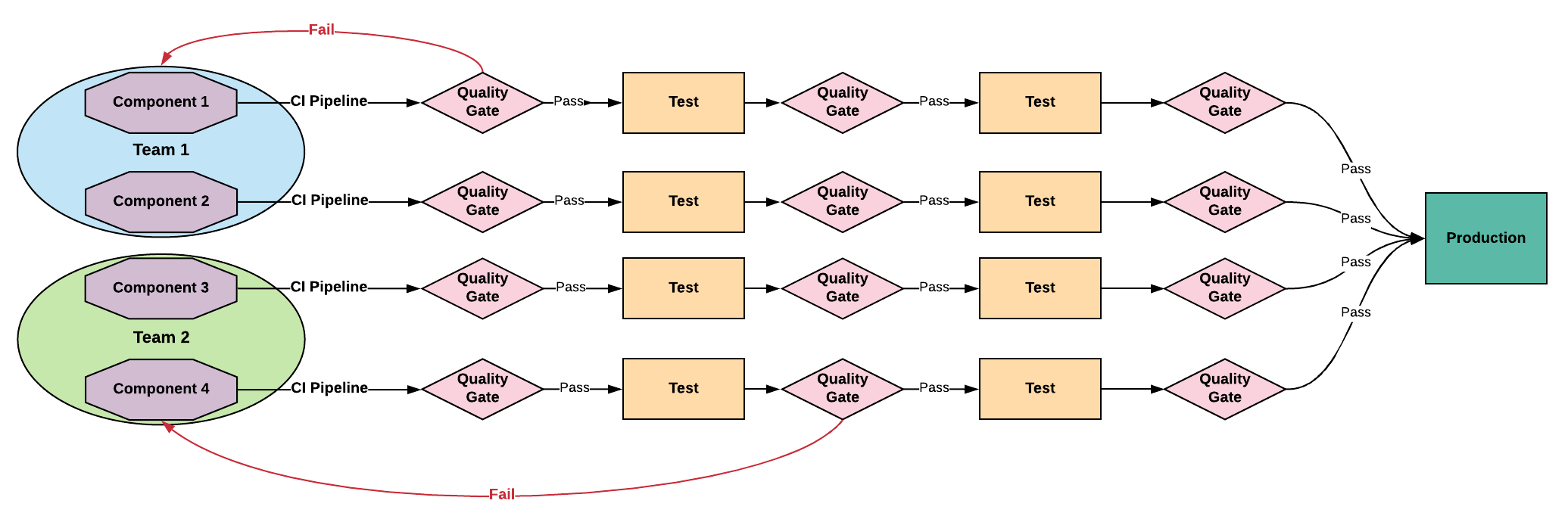
Loosely Coupled Architecture - Goal
Loosely Coupled Architecture
Characteristics
Components delivered independently
Reduced complexity
Improved quality feedback loops
Relies on clean team separations and mature testing practices
Common Loosely Coupled Practices
Team Structure: Product teams maintain independent components
Development Process: Continuous integration
Branching: Trunk-Based Development
Testing: Developer Driven Testing
Pipeline: One or more independently deployable CD pipelines
Deploy Cadence / Risk: On-demand or immediate delivery, lowest risk
2. Stabilize the Quality Signal
After establishing a production pipeline, focus on improving the quality signal:
Remove flaky tests from the pipeline
Identify causes for test instability and take corrective action
Bias towards testing enough, but not over-testing
Track pipeline duration and set a quality gate for maximum duration
Visual guide to the dependencies and practices that enable Continuous Delivery
The practices and capabilities shown below are based on research and industry standards documented at MinimumCD.org Practices.
Overview
Continuous Delivery is built on a foundation of practices that depend on each other. This dependency tree shows how fundamental practices like Trunk-Based Development, Test-Driven Development, and Behavior-Driven Development support Continuous Integration, which in turn enables Continuous Delivery.
For detailed information about each practice, including implementation guides and research backing, visit practices.minimumcd.org.
CD Dependency Tree
%%{init: {'securityLevel': 'loose', 'theme': 'base', 'themeVariables': { 'primaryColor': '#ff0000'}}}%%
graph BT
TDD([Test Driven Development.])-->CI
BDD([Behavior Driven Development.])-->TDD
TBD([Trunk-based Development.])-->CI
CI([Continuous Integration.])-->CD([Continuous Delivery.])
4-->CI
1([dedicated build server])-->4
2([scripted builds])-->1
3([versioned code base])-->2
4([builds are stored])
CI-->4
5([auto-triggered build])-->CI
2-->6([automated tag & versioning])
CI-->7([pipeline with deploy to prod])
7-->CD
7-->8([build once, auto-deploy anywhere])
9([scripted config changes])-->CD
10([standard process for all envs])-->CD
11([automatic DB deploys])-->CD
12([zero downtime deploys])-->CD
13([zero-touch continuous deployments])-->CD
14([defined & documented product development process])-->CI
15([definition of done])-->14
16([prioritized work])-->14
17([working agreements])-->14
18([adopt basic Agile methods])
19([one backlog per team])
20([remove boundaries between dev, test, & support])
21([share the pain])
22([stable teams])
23([act on build, quality, test, deploy and operational metrics])
24([common process for all changes])
25([component ownership])
26([decentralize decisions])
27([extended team collaboration])
28([frequent commits])
29([dedicated continuous improvement process])
30([dedicated tools team])
31([deploy disconnected from release])
32([team responsible thru release])
33([cross-functional teams])
34([no rollbacks, always roll forward])
35([consolidated platform & tech])
36([automated api management ])
37([library  management])
38([organize system into modules])
39([version control DB changes])
40([branch by abstraction])
41([configuration as code / managed configs])
42([feature hiding / toggling])
43([making components from modules])
44([no long-lived branches, trunk-based development])
45([full component based arch])
46([push business metrics])
47([infrastructure as code])
48([baseline process metrics])
49([manual reporting])
50([measure the process])
51([scheduled quality reports])
52([static code analysis])
53([common information model])
54([report history is available])
55([traceability built into pipeline])
56([dynamic test coverage analysis])
57([graphing as a service])
58([report trend analysis])
59([cross-silo analysis])
60([dynamic graphing and dashboards])
61([automatic unit tests])
62([separate test environment])
63([automatic integration tests])
64([automatic isolated component tests])
65([some automatic acceptance tests])
66([automatic performance tests])
67([automatic security tests])
68([full automatic acceptance tests])
69([risk-based manual testing])
70([hypothesis-driven development])
71([verify expected business value ])
5 - 24 Capabilities to Drive Improvement
Research-backed practices from the State of DevOps reports and DORA metrics
“Our research has uncovered 24 key capabilities that drive improvements in software delivery performance in a statistically significant way. Our book details these findings.”
Version control is the use of a version control system, such as GitHub or Subversion, for all production artifacts,
including application code, application configurations, system configurations, and scripts for automating build and
configuration of the environment.
Automate your deployment process
Deployment automation is the degree to which deployments are fully automated and do not require manual intervention.
Implement continuous integration
Continuous integration (CI) is the first step towards continuous delivery.
This is a development practice where code is regularly
checked in, and each check-in triggers a set of quick tests to discover serious regressions, which developers fix immediately. The
CI process creates canonical builds and packages that are ultimately deployed and released.
Use trunk-based development methods
Trunk-based development has been shown to be a predictor of high performance in software development and delivery. It is
characterized by fewer than three active branches in a code repository; branches and forks having very short lifetimes
(e.g., less than a day) before being merged into trunk; and application teams rarely or never having code lock periods
when no one can check in code or do pull requests due to merging conflicts, code freezes, or stabilization phases.
Implement test automation
Test automation is a practice where software tests are run automatically (not manually) continuously throughout the
development process. Effective test suites are reliable—that is, tests find real failures and only pass releasable code.
Note that developers should be primarily responsible for creation and maintenance of automated test suites.
Support test data management
Test data requires careful maintenance, and test data management is becoming an increasingly important part of automated
testing. Effective practices include having adequate data to run your test suite, the ability to acquire necessary data
on demand, the ability to condition your test data in your pipeline, and the data not limiting the amount of tests you
can run. We do caution, however, that teams should minimize, whenever possible, the amount of test data needed to run
automated tests.
Shift left on security
Integrating security into the design and testing phases of the software development process is key to driving IT
performance. This includes conducting security reviews of applications, including the Infosec team in the design and
demo process for applications, using pre-approved security libraries and packages, and testing security features as a
part of the automated testing suite.
Implement continuous delivery (CD)
CD is a development practice where software is in a deployable state throughout its lifecycle, and the team prioritizes keeping the
software in a deployable state over working on new features. Fast feedback on the quality and deployability of the system is
available to all team members, and when they get reports that the system isn’t deployable, fixes are made quickly.
Finally, the system can be deployed to production or end users at any time, on demand.
Architecture Capabilities
Use a loosely coupled architecture
This affects the extent to which a team can test and deploy their applications on demand, without requiring orchestration with other
services. Having a loosely coupled architecture allows your teams to work independently, without relying on other teams for support
and services, which in turn enables them to work quickly and deliver value to the organization.
Architect for empowered teams
Our research shows that teams that can choose which tools to use do better at continuous delivery and, in turn, drive
better software development and delivery performance. No one knows better than practitioners what they need to be
effective.
Product and Process Capabilities
Gather and implement customer feedback
Our research has found that whether organizations actively and regularly seek customer feedback and incorporate this
feedback into the design of their products is important to software delivery performance.
Make the flow of work visible through the value stream
Teams should have a good understanding of and visibility into the flow of work from the business all the way through to
customers, including the status of products and features. Our research has found this has a positive impact on IT
performance.
Work in small batches
Teams should slice work into small pieces that can be completed in a week or less. The key is to have work decomposed
into small features that allow for rapid development, instead of developing complex features on branches and releasing
them infrequently. This idea can be applied at the feature and the product level. (An MVP is a prototype of a product
with just enough features to enable validated learning about the product and its business model.) Working in small
batches enables short lead times and faster feedback loops.
Foster and enable team experimentation
Team experimentation is the ability of developers to try out new ideas and create and update specifications during the
development process, without requiring approval from outside of the team, which allows them to innovate quickly and
create value. This is particularly impactful when combined with working in small batches, incorporating customer
feedback, and making the flow of work visible.
Lean Management and Monitoring Capabilities
Have a lightweight change approval process
Our research shows that a lightweight change approval process based on peer review (pair programming or intra-team code
review) produces superior IT performance than using external change approval boards (CABs).
Monitor across application and infrastructure to inform business decisions
Use data from application and infrastructure monitoring tools to take action and make business decisions. This goes
beyond paging people when things go wrong.
Check system health proactively
Monitor system health, using threshold and rate-of-change warnings, to enable teams to preemptively detect and mitigate problems.
Improve processes and manage work with work-in-progress (WIP) limits
The use of work-in-progress limits to manage the flow of work is well known in the Lean community. When used
effectively, this drives process improvement, increases throughput, and makes constraints visible in the system.
Visualize work to monitor quality and communicate throughout the team
Visual displays, such as dashboards or internal websites, used to monitor quality and work in progress have been shown
to contribute to software delivery performance.
Cultural Capabilities
Support a generative culture (as outlined by Westrum)
This measure of organizational culture is based on a typology developed by Ron Westrum, a sociologist who studied
safety-critical complex systems in the domains of aviation and healthcare. Our research has found that this measure of
culture is predictive of IT performance, organizational performance, and decreasing burnout. Hallmarks of this measure
include good information flow, high cooperation and trust, bridging between teams, and conscious inquiry.
Encourage and support learning
Is learning, in your culture, considered essential for continued progress? Is learning thought of as a cost or an
investment? This is a measure of an organization’s learning culture.
Support and facilitate collaboration among teams
This reflects how well teams, which have traditionally been siloed, interact in development, operations, and information security.
Provide resources and tools that make work meaningful
This particular measure of job satisfaction is about doing work that is challenging and meaningful, and being empowered
to exercise your skills and judgment. It is also about being given the tools and resources needed to do your job well.
Support or embody transformational leadership
Transformational leadership supports and amplifies the technical and process work that is so essential in DevOps. It is
comprised of five factors: vision, intellectual stimulation, inspirational communication, supportive leadership, and
personal recognition.